QUESTIONS?
CONTACT US!
800.903.6571
sales@POSGuys.com
6am - 5pm PST (Mon - Fri)
Buyer's Guide for Mobile Printers
Please Note: Some of the products linked in this buyer guide might be out of date. We are working to update this documentation. Please reach out to our sales team if you have any questions.
Learn Mobile Printer Basics From The Pros
 How
do Mobile Printers Work?
How
do Mobile Printers Work?
Mobile printers, when connected to a computer via a
cable interface or Bluetooth, receive data from the point of sales software
application running on the computer. The data is interpreted through the
printer's device driver and subsequently printed. Mobile printers are
available with the ability to print receipts, labels, or both.
Depending on the model, a portable bluetooth receipt printer will print receipts using
Bluetooth wireless technology, or will attach directly to a PDA-style
handheld device to receive the printable data. The technology and mobility
advantages of these devices dictate their higher price.
 What Kind of Mobile Printer Should I Buy?
There are a variety of important considerations to factor in when choosing the type of mobile printer that will work best for you. These considerations include software requirements and device drivers, cable interfaces, bluetooth capabilities, environment restrictions and overall functionality, i.e. speed, size, etc.
The type of media printing capabilities, i.e. labels, receipts, or both is another feature to consider. Having the flexibility to print both can be an added bonus if needed, but not necessary if you won't be using label printing option.
The battery life of your moblie printer will be an important feature
to consider. How long printer be used between charges and the need for
an extra power source are determining factors for power supply needs.
Software Requirements and Device Drivers
Some software applications only work with specific mobile printer drivers,
so it is advisable to check with the software manufacturer to determine
the compatibility of a specific mobile printer with your software. Some
point of sale applications will require OLE for Point of Sale, OPOS, drivers
to properly print receipts, while others may use generic Windows drivers.
Power Supply
Mobile devices functionality is dependent on their power supply. With
mobile printers, there are multiple ways to ensure you are never without
power to run your printer. The printers run on battery packs which periodically
need to be recharged, the length of the battery depending on specific
battery used. Having an additional rechargeable battery can be a good
idea as a back up supply. Other backup power supply accessories include
12-volt car adapters and AC adapaters both which allow you to plug mobile
printer into an anvailable power supply.
When considering a mobile printers, there are a number of considerations concerning environment and functionality. Some final questions to ask include:
- Will printing be done indoors or outdoors?
- Will extreme temperature, both hot and cold, be a factor?
- What will mobile printer be printing? Labels? Receipts? Both?
- Are printer dimensions a factor? What about receipt width?
- How long will the printer's battery run before needing to recharge?
Printing Method
Most mobile printers use direct thermal printing. This process means that printing is not dependent on the life of a ribbon, but instead the amount of thermal paper available. The media used, receipt paper or labels depending on printer model, is a heat sensitive thermal paper which darkens with exposure to heat. During printing, the print head is in direct contact with this paper, thereby using heat and pressure to mark the labels. These printer have print heads with longer durability and the overall cost of operation of the printer is lower due to lack of ribbon cost.
Mobile Printer Types:
 Zebra QL320 Plus
 |
Label Printers Label Printers provide fast solutions for label printing in fields such as mobile sales, healthcare, and other locations where space and mobility are key to success. Printers come with a range of battery life capabilities, paper size, and printing speed. Recommended Models: Zebra QL320 Plus or Zebra QL420 Plus |
 Unitech MP200
 |
Receipt Printers Receipt Printers provide mobile receipt printing capabilities for hospitality, transportation, mobile sales, and law enforcement. Printers come with a range of battery life capabilities, paper size, and printing speed. Recommended Models: Epson Mobilink or Datamax-O'Neil Apex 2 |
 O'Neil OC3
 |
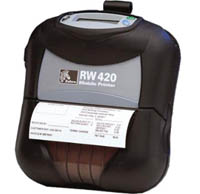
Label and Receipt Printers The combination mobile printers with the ability to print both labels and receipts offer ultimate mobility and options of printing capabilities. Printers come with a range of battery life capabilities, paper size, and printing speed. Recommended Models: Zebra RW 420 or O'Neil OC3 |
For a downloadable version of this review click here