QUESTIONS?
CONTACT US!
800.903.6571
sales@POSGuys.com
6am - 5pm PST (Mon - Fri)
Buyer's Guide for POS Receipt Printers
Please Note: Some of the products linked in this buyer guide might be out of date. We are working to update this documentation. Please reach out to our sales team if you have any questions.
Learn Receipt Printer Basics From The Pros

How Do Receipt Printers Work?
Receipt Printers act very similarly to full-sized printers; they connect to your computer and usually receive print commands from installed driver software. These printers do offer additional functionality vital to high-stakes retail & restaurant environments, including fast print speeds, energy efficiency, and the ability to open cash drawers on command.
What Kind of Receipt Printer Do I Buy?
POSGuys.com carries a wide variety of receipt printers, ideal for many budgets and applications. The most important consideration is what printers are compatible with your POS software. Aside from that, you will want to determine what kind of interface you need, whether you need an auto cutter, or if you have environmental restrictions that would prevent some printers from working well.
Software Requirements and Device Drivers
Some POS software has specific hardware and driver requirements, so it is important to double check before buying a receipt printer. For instance, some software requires OLE for point of sale drivers, otherwise known as OPOS, while others work fine with Windows, Mac OS, or Linux drivers. Epson receipt printers offer compatibility with most OPOS drivers and have their own Windows drivers, so they are smart choice if you are uncertain which drivers you need.
Many receipt printers on the market offer cross compatibility with major brands and command sets, giving you more options if you need to replace an aging receipt printer. Some of these printers do require additional configuration to change emulation modes; our excellent support staff is happy to help you with these changes.
Cable Interfaces
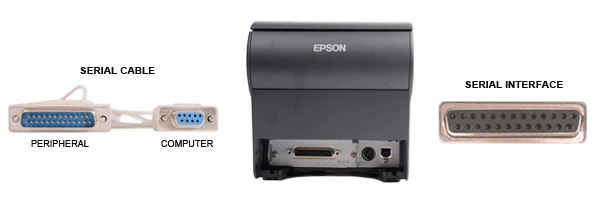
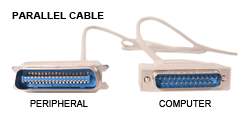
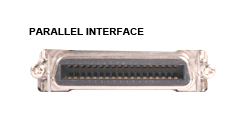
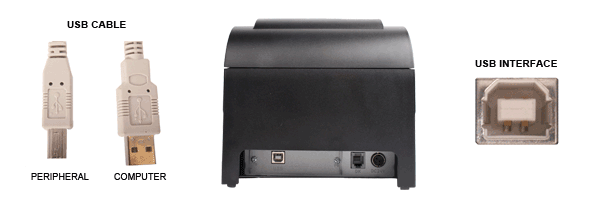
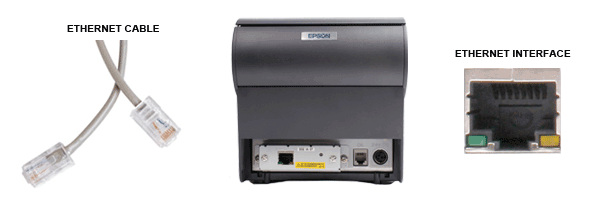
There are many ways to connect a receipt printer to your POS computer, including USB, Serial, Parallel, and even networked via Ethernet. Depending on your POS software, some of these interfaces will work better than others for connecting your receipt printer. The diagram below has images on the major interfaces available and what they look like both on the back of a POS computer as well as the receipt printer.
Serial Cable and Printer Interface Examples

Parallel Cable and Printer Interface Examples
USB Cable and Printer Interface Examples
Ethernet Cable and Printer Interface Examples
Wireless Interfaces
If you'd prefer not to run a cable from your computer/router to your printer - or if you're using a tablet for your POS station - then you're probably going to be using either a Bluetooth or Wireless connection.
Bluetooth
In general, to get a Bluetooth setup configured, your POS software will need to be specifically programmed to work with Bluetooth printers and you'll need a special Bluetooth-equipped model of a printer. A big thing to note of this sort of setup is that Bluetooth is a one-to-one pair. This means that you can only have one device connected to a printer at a time.
WiFi
WiFi printers work very similar to Ethernet printers in terms of how they communicate with your POS application. Instead of running a network cable from the printer to the router, a WiFi printer will communicate directly with your router and then will be discoverable on your network just like any other Ethernet printer. Depending on the type of printer you have, some Ethernet printers can be converted into WiFi printers with an add-on dongle but these require specialized setup - give us a call if you have questions on this.Unlike Bluetooth printers, these printers are one-to-many devices, which means these printers can often communicate with as many devices on your network as you'd like. When using WiFi printers, it's important to keep in mind how far the printer will be from the router. If you move the printer too far from the router, it may start to have trouble communicating which will lead to an unstable connection.
Receipt Cutting
Most receipt printers come with an auto cutter standard, though some offer a manual tear bar instead. Having an auto-cutter ensures clean separation of receipts and reduces jams that can occur from poorly torn receipts.
Environment Restrictions and Additional Functionality
Some environments have specific needs that make some receipt printers a smarter choice than others. For instance, in kitchens or dry cleaners, an impact receipt printer is ideal; the printouts can handle extreme temperatures and humidity better than direct thermal printouts. Below are some common questions to ask before choosing a receipt printer.
- Is speed a factor?
- Do you need multiple colors on a single receipt?
- Do you want to print on-the-go?
- Do you take checks at your business?
- Do you need carbon copies of receipts?
POSGuys splits receipt printers into major subcategories based on features and functionality. So once you have an idea on where the printer will be installed and what features you need, our categorical breakdown should help you find the product best suited for your needs.
Receipt Printer Types

| Impact Receipt PrintersImpact receipt printers are some of the longest running on the market. Similar to the older tractor-feed style printers of the 1980s, these printers use a series of small pins to press and transfer ink from a ribbon onto receipts. Many impact receipt printers can print up to two colors using special two-tone ribbons, making them a smart choice for businesses where order changes need to be stark and apparent. Recommended Use: Kitchens/heat-intensive environments, or any retail POS environment where duplicate receipts or two-color printing are required. Models to Try: POS-X EVO Impact or Epson TM-U220 |

| Direct Thermal Receipt PrintersAs the most popular receipt printer style on the market, direct thermal receipt printers offer a combination of speed and easy operation ideal for most retailers. Direct thermal printing uses heat to activate an emulsion in special heat-sensitive receipt paper, eliminating the need for additional media when printing. These printers are remarkably fast, with top print speeds at over one foot of receipt per second. Recommended Use: High volume receipt printing in retail and restaurant environments. Models to Try: POS-X EVO HiSpeed or Epson TM-T88V |

| Ink Jet Receipt PrintersInk jet receipt printers use the same type of technology you see in home printers, using tiny nozzles to spray ink onto receipts. With ink jet printing, you can add color logos or other personalized elements to your receipts. However, you do have to buy replacement ink jet cartridges, adding to the long term costs. Recommended Use: Retail, banking, or any business wanting quieter, color printing. Models to Try: Ithaca POSJet 1500 |

| POS Multi-Function Receipt PrintersMulti-Function receipt printers combine various retail functions into a single, space-saving solution. With support for receipt printing, slip printing, check endorsing, MICR, and sometimes even barcode scanning, these receipt printers are a fantastic choice for higher volume retailers, banks, or any place where space is a premium but multiple payment types are accepted. Recommended Use: Banks, grocery stores, department stores, or any business that accepts checks. Models to Try: Epson TM-H6000IV or TPG A776 |

| Mobile Receipt PrintersMobile receipt printers offer the portability necessary for field service crews, law enforcement, and mobile POS applications. The printers receive print jobs either through special cabled interfaces or by pairing wirelessly to your device. Select models include a DEX interface, allowing delivery drivers to connect directly to grocery store POS systems and upload inventory data. Recommended Use: Mobile POS, line busting, delivery service, or any job needing receipt printing on the go. Models to Try: Epson Mobilink TM-P60II or Zebra RW 420 |